Quick answer
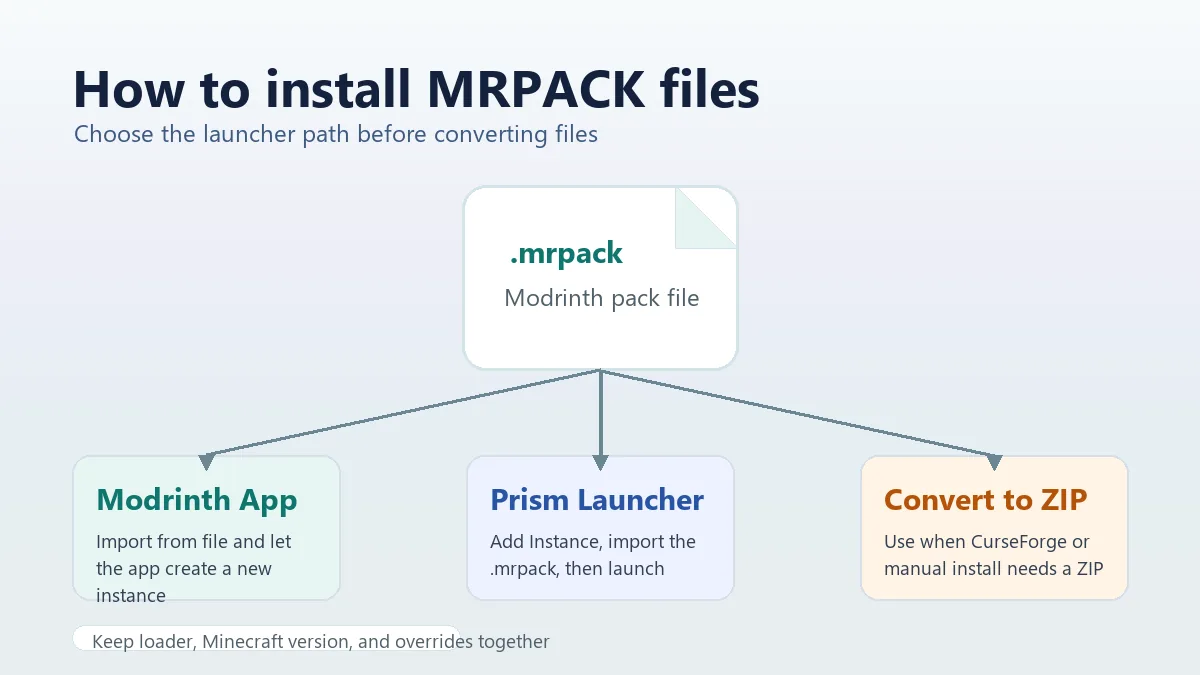
To install an MRPACK file, import it with a launcher that understands the Modrinth modpack format. Modrinth App and Prism Launcher are the simplest routes. If you are still deciding what app should open the file, start with the MRPACK opening guide. If your launcher only accepts ZIP profiles, convert the MRPACK to ZIP first, then install the resulting folders with the correct Minecraft version and mod loader.
What an MRPACK file is before you install it
An .mrpack file is a Modrinth modpack package. It is ZIP-based, but it is not the same thing as a normal folder of mod JARs. The official Modrinth MRPACK format documentation describes a root modrinth.index.json manifest, file paths, hashes, dependencies, and override folders. That manifest tells a compatible launcher which Minecraft version, loader, files, and download URLs belong to the pack.
This matters because many installation problems come from treating the file as a plain ZIP too early. If you only extract the archive and move random folders into .minecraft, you may miss dependencies, optional files, loader settings, or client/server-specific overrides. Start by deciding whether your launcher can import MRPACK natively.
Best installation path by launcher
The right workflow depends on the launcher you want to use. This table keeps the decision simple before you start moving files.
| Launcher or setup | Best path | Why | Watch for |
|---|---|---|---|
| Modrinth App | Import the .mrpack as a new instance. |
It is built for Modrinth packs and can read the manifest directly. | Current UI labels may change, but the import-from-file idea remains the same. |
| Prism Launcher | Add or import an instance from the .mrpack file. |
Prism is a good fallback when Modrinth App import fails or you prefer a multi-source launcher. | Keep it as a new instance instead of merging into an old profile. |
| CurseForge App | Convert MRPACK to ZIP, then use a compatible ZIP import or manual install. | CurseForge support documents ZIP/profile import flows, while raw MRPACK is a different format. | A converted ZIP is not always the same as a CurseForge export ZIP. |
| Vanilla Minecraft Launcher | Convert to ZIP, install the loader manually, then copy folders into a profile. | The vanilla launcher does not install Modrinth manifests by itself. | You must match Forge, Fabric, Quilt, or NeoForge and the Minecraft version. |
| TLauncher | Convert MRPACK to ZIP, then install the converted folders into a clean matching profile. See the TLauncher MRPACK guide for the exact checklist. | TLauncher mod installation is not the same as native Modrinth MRPACK import. | Do not place the raw .mrpack file directly in mods. |
| Server setup | Use a server-aware tool or convert and inspect the ZIP. See the MRPACK server install guide for the detailed server workflow. | Some packs include client-only mods or client override folders that do not belong on a server. | Check server-side compatibility before uploading everything. |
How to install MRPACK with Modrinth App
Use Modrinth App when you want the closest native experience. It is the most direct answer to "how to install MRPACK" because the format belongs to the Modrinth ecosystem.
- Download the
.mrpackfile from the pack author, a Modrinth project page, or a trusted private share. - Open Modrinth App and look for the create, add, import, or from-file option in the instance area.
- Select the
.mrpackfile and let the app create a new instance. - Wait for the app to download the referenced mod files and install the required loader.
- Launch the instance and verify that the pack name, Minecraft version, and loader match the pack page.
Do not merge a new MRPACK into an unrelated old instance unless the pack author explicitly says that is supported. MRPACK files describe a complete pack state. Treating them as a loose mod folder can create version conflicts that are hard to debug.
How to install MRPACK with Prism Launcher
Prism Launcher is useful when you want more control, need a cross-platform launcher, or are troubleshooting Modrinth App. The exact button labels can vary by release, but the workflow is normally to add a new instance and import the modpack file. For the complete Prism-specific path, see how to import an MRPACK to Prism Launcher, including direct-link imports and failed-download troubleshooting.
- Open Prism Launcher and choose the option to add a new instance.
- Choose the import option and select the
.mrpackfile. - Confirm the instance name and group if Prism asks for them.
- Let Prism read the manifest and download the referenced files.
- Before launching, check the instance settings for the loader and Java version.
If Prism says it cannot open the supplied modpack archive, first verify that the download is complete. A zero-byte file, interrupted browser download, renamed non-MRPACK archive, or corrupted share link can all produce an import error.
Can you use an MRPACK file on CurseForge?
CurseForge is a common source of confusion because its app can import modpack ZIP profiles, but that does not mean every ZIP-like modpack format is accepted. CurseForge's own support page for exporting and importing modpacks describes importing a profile ZIP or profile code, not importing raw Modrinth MRPACK files.
If you need to use CurseForge, start by converting the MRPACK with the MRPACK to ZIP converter. Then inspect the output. If the ZIP contains the folders you need, you can try a CurseForge import where appropriate or manually copy the folders into a compatible profile. If the app rejects the file as invalid, use the manual install path instead of repeatedly renaming extensions.
Do not just rename .mrpack to .zip and call it installed
Renaming can help you inspect the archive, but it does not download remote mod files, install the loader, or validate client/server side rules. A proper conversion reads the manifest and collects the referenced files into a usable ZIP-style package.
How to install MRPACK without Modrinth
If you do not want to use Modrinth App, choose between a launcher that supports MRPACK directly and a ZIP conversion workflow.
Option 1: Use a launcher with native MRPACK support
Prism Launcher is usually the easiest non-Modrinth choice. It keeps the pack as an instance, respects the manifest, and avoids a lot of manual file placement. Technical users can also use libraries or tooling that support MRPACK installation. For example, minecraft-launcher-lib documents MRPACK installation helpers, which shows that the format can be handled programmatically when the tool reads the manifest correctly.
Option 2: Convert MRPACK to ZIP
Use ZIP conversion when your target launcher does not understand MRPACK, when you are preparing a server folder, or when you need to inspect files before moving them. Open the converter tool, choose project ID, direct URL, or local file upload, and download the ZIP output. For dedicated hosting, follow the install MRPACK on a server checklist before uploading files. The ZIP route is also useful if your real goal is to extract mod JARs, which is covered in the MRPACK to JAR guide.
Manual install after converting MRPACK to ZIP
A manual installation is more work, but it is predictable if you keep the pack's version requirements intact.
- Convert the MRPACK to ZIP with this site's converter.
- Extract the ZIP into a temporary folder so you can inspect it before touching your main Minecraft folder.
- Read the pack information, Minecraft version, and loader requirement. Install that loader first.
- Copy
mods,config,resourcepacks,shaderpacks, and other override folders into the matching profile or server directory. - Launch once, then check logs for missing dependencies, wrong loader warnings, or client-only mods on a server.
If a converted ZIP includes a failed-download list, do not ignore it. Those entries usually mean the browser could not fetch a file because the source host blocked cross-origin downloads. Download the exact file manually from the listed source or from the official mod page, then place it in the folder path shown by the converter.
Common errors and fixes
The launcher does not show the MRPACK file
The launcher may be filtering for a different extension. Confirm that you are using an import flow meant for Modrinth packs, not a generic ZIP or CurseForge profile import. If the launcher cannot import MRPACK, use conversion instead.
The import starts and then disappears
This often points to a broken download, missing network access for referenced files, or a launcher-side bug. Download the MRPACK again, try a clean new instance, or import it in Prism Launcher to isolate whether the issue is the file or the launcher.
The pack launches but crashes immediately
Check loader, Minecraft version, Java version, and optional dependencies. Many crashes are caused by mixing a Fabric pack into a Forge profile, using the wrong Minecraft release, or copying only the mods folder while skipping configs and overrides.
The server crashes after installing a converted pack
Look for client-only mods, client-only override folders, and mods that require a separate server file. A pack designed for players is not automatically safe for a dedicated server. Remove client-only entries only after you understand the pack requirements.
When to convert instead of importing directly
Direct import is best when you are playing the pack in a launcher that supports MRPACK. Conversion is better when you need a ZIP for manual install, CurseForge experimentation, server preparation, cross-platform file sharing, or inspection. The broader Modrinth modpack to ZIP guide explains the full conversion workflow in more detail.
If your goal is the reverse direction, such as turning a normal ZIP into a valid Modrinth pack, read the ZIP to MRPACK guide. That job requires metadata reconstruction and should not be confused with installing an existing MRPACK file.
FAQ
What program opens MRPACK files?
Modrinth App and Prism Launcher are the easiest options for most players. Developer-oriented tools can also parse MRPACK files, but typical players should use a launcher or convert the file to ZIP.
Is an MRPACK file just a ZIP file?
It is ZIP-based, but it is not just a renamed ZIP mod folder. The manifest and file references are the important parts. A launcher or converter must read those correctly.
Where do I put MRPACK files in Minecraft?
You usually do not put the raw MRPACK directly into .minecraft/mods. Import it through a compatible launcher, or convert it and copy the converted folders into the correct profile.
Can I install MRPACK on a server?
Sometimes. Use a server-aware installation path, or convert and inspect the files first. Remove client-only content carefully and match the loader and Minecraft version.
Can I use MRPACK without internet?
Only after the referenced files have already been downloaded or bundled into a converted package. A normal MRPACK often stores download URLs instead of every mod JAR, so first-time installation usually needs internet access.
Final takeaway
If your launcher supports MRPACK, import the file as a new instance. If it does not, convert the pack to ZIP and install the resulting files deliberately. The key is to preserve the pack's manifest intent: correct Minecraft version, correct loader, required files, and overrides.
Need a ZIP for manual install?
Use the browser-based converter when your launcher or server workflow cannot import .mrpack directly.