Quick answer
If you want to import MRPACK to CurseForge, expect friction. A .mrpack is a Modrinth modpack archive built around modrinth.index.json. CurseForge import flows are built around CurseForge profile ZIPs and profile codes. Those are different package formats, even though both can look like ZIP archives.
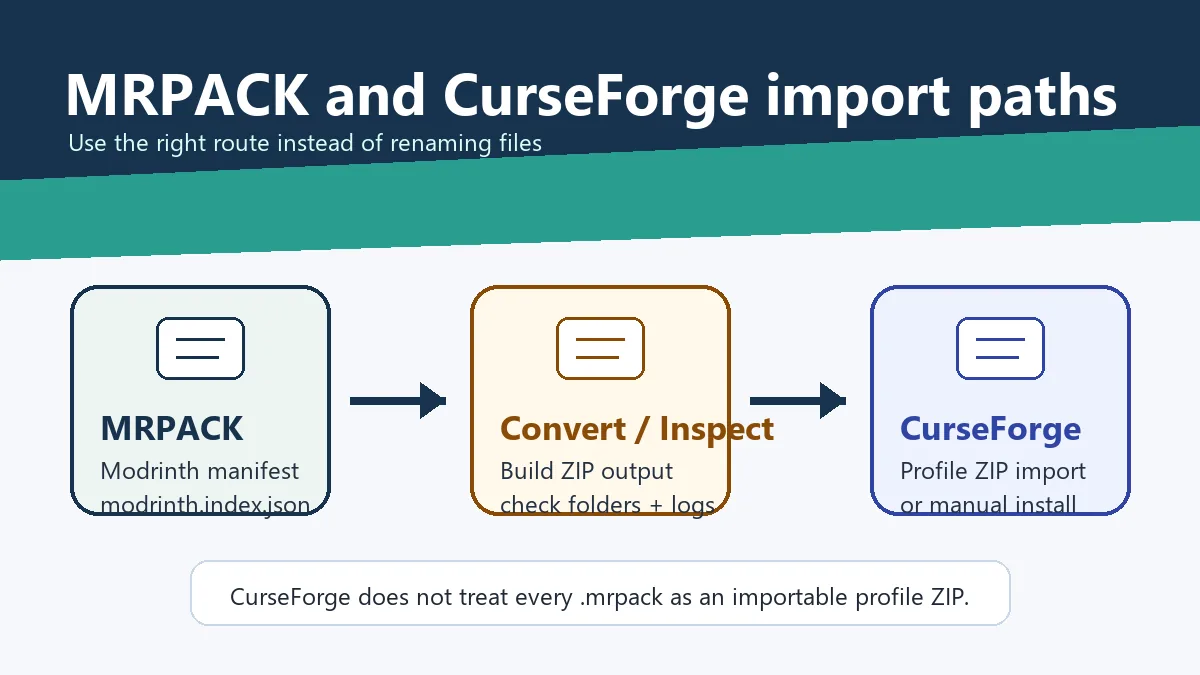
The practical path is: try a MRPACK-aware launcher first, convert the MRPACK to a ZIP when you need manual files, and only use CurseForge import if the resulting package matches what CurseForge expects. Repeatedly renaming .mrpack to .zip does not create a valid CurseForge profile.
Why this is confusing
The confusion starts because MRPACK is ZIP-based. You can open many .mrpack files with a normal archive tool and see folders plus a manifest. That makes it tempting to rename the file or drag it into any launcher that accepts modpack ZIPs.
But an importer does not only check whether the archive can be unzipped. It checks the manifest, folder layout, dependency model, and expected download references. Modrinth and CurseForge use different manifest conventions, so a valid Modrinth pack can still look invalid to CurseForge.
MRPACK vs CurseForge profile ZIP
A Modrinth MRPACK usually describes files through modrinth.index.json. A CurseForge exported profile ZIP follows CurseForge's own profile export structure. The difference matters most when a pack references remote files instead of bundling every mod JAR.
| Question | Modrinth MRPACK | CurseForge profile ZIP |
|---|---|---|
| Main manifest | modrinth.index.json |
CurseForge profile metadata such as manifest.json |
| Best native importer | Modrinth App, Prism Launcher, or another MRPACK-aware workflow | CurseForge App profile import or profile code workflow |
| Typical failure in the wrong app | "Invalid file", missing profile data, or nothing happens after selection | MRPACK-aware tools do not know how to resolve CurseForge-only metadata automatically |
| Safest bridge | Convert to ZIP and inspect files, or rebuild the pack with proper metadata | Export from CurseForge, then rebuild for Modrinth if you need a true MRPACK |
Can CurseForge import MRPACK directly?
Usually, no. CurseForge can import packs, but the documented flow is for CurseForge-style exports and profile codes, not raw Modrinth .mrpack files. The official CurseForge support article for exporting and importing modpacks describes profile ZIP and profile code workflows.
That is why users often see an "invalid file" result after selecting a perfectly real MRPACK. The file may be valid for Modrinth App or Prism Launcher while still being the wrong import type for CurseForge.
Modrinth to CurseForge converter: what conversion can and cannot do
A Modrinth to CurseForge converter can help resolve an MRPACK into files you can inspect or copy, but it cannot guarantee a native CurseForge export. CurseForge profile metadata, platform project IDs, loader settings, and available mod versions still need to match the destination instance.
| Starting point | What conversion gives you | What you still must verify |
|---|---|---|
Raw .mrpack | Manifest, overrides, and resolvable mod files | Minecraft version, loader version, and a clean CurseForge profile |
| Converted ZIP | Files suitable for inspection or deliberate copying | Whether every mod is allowed and compatible in the destination profile |
| Existing CurseForge profile | A controlled destination | Backups, version match, duplicate mods, and config conflicts |
Example: a Fabric MRPACK for Minecraft 1.21 should not be copied into a Forge 1.20.1 CurseForge profile. Create a new Fabric 1.21 profile first, then add the resolved mods and overrides in stages so a failed dependency or incompatible file is easy to identify.
Best workflow when you need CurseForge
If your final goal is "play this pack in a CurseForge-managed instance", use this order. It avoids damaging your existing profile and gives you a clear fallback when the app rejects the file.
- Make a copy of the MRPACK file. Keep the original untouched so you can retry with Modrinth App or Prism Launcher.
- Confirm the pack source. If it came from a Modrinth project, check the required Minecraft version and loader on the project page.
- Convert the MRPACK to ZIP. Use the MRPACK to ZIP converter to resolve the manifest into a more inspectable output.
- Inspect the ZIP before importing. Check for
mods,config,resourcepacks,shaderpacks, and any failed-download list. - Create a clean CurseForge profile with the right loader. Match Minecraft, Forge, Fabric, Quilt, or NeoForge before copying files.
- Try import only when the ZIP matches CurseForge expectations. If CurseForge rejects it, switch to manual placement inside the clean profile instead of renaming files again.
- Launch and read the logs. Missing dependencies, wrong loader versions, and client/server mismatches are easier to fix when the profile starts clean.
Important: ZIP conversion is not the same as a CurseForge export
A converted ZIP can be useful for manual install, server prep, or inspection. It is not guaranteed to become a CurseForge-exported profile ZIP. Treat the conversion output as a bridge for files and structure, not as a promise that the CurseForge app will accept it through every import dialog.
When you should not use CurseForge for the MRPACK
Use a native MRPACK path when you simply want to play the pack and do not specifically need CurseForge profile management. Modrinth App understands Modrinth packs directly. Prism Launcher is also a strong option because its import documentation covers ZIP-style modpack imports and common launcher workflows, and it is often more forgiving for cross-ecosystem packs.
If a pack author publishes a Modrinth project and not a CurseForge project, the native route is usually less error-prone. You preserve the manifest intent, file hashes, dependency references, and override folders instead of translating the pack into a different ecosystem first.
How to handle common CurseForge errors
"Invalid file" after selecting the MRPACK
This normally means the import dialog expected a CurseForge profile ZIP, not a Modrinth MRPACK. Open the pack with a MRPACK-aware launcher, or convert it and install the resulting files manually.
The app accepts the ZIP but the pack is empty
The ZIP probably does not contain the profile metadata CurseForge wanted, or the mods were referenced remotely and were not bundled. Inspect the ZIP output and look for failed downloads. If files are missing, download them from official project pages and place them in the expected paths.
The game crashes after manual install
Check the loader first. A Fabric MRPACK copied into a Forge profile will not become a Forge pack. Then check the Minecraft version, Java version, and whether the pack relies on override files that were skipped during copying.
Server files do not work after import
CurseForge client profiles and server folders are not interchangeable. Look for client-only mods, client-only configs, and server-specific overrides. For deeper server preparation, convert and inspect the pack rather than trusting a one-click import, then use the MRPACK server install guide to review the server folder.
How this differs from ZIP to MRPACK
Importing MRPACK into CurseForge is a forward compatibility problem: you are trying to use a Modrinth pack in a CurseForge workflow. ZIP to MRPACK is the reverse problem: rebuilding a normal ZIP or CurseForge-style package into a valid Modrinth pack. Both require manifest awareness, but the direction and risk are different.
If you are a pack maintainer, do not publish a converted archive without checking permissions, file hashes, source URLs, and dependency metadata. The modrinth.index.json guide explains the manifest fields that make this work reliably.
Decision table
| Your goal | Recommended path | Why |
|---|---|---|
| Play a Modrinth pack quickly | Import the .mrpack with Modrinth App or Prism Launcher. |
These paths understand the MRPACK manifest and dependency model. |
| Use files inside a CurseForge profile | Convert MRPACK to ZIP, create a matching clean profile, and copy files deliberately. | This avoids forcing CurseForge to parse a different package format. |
| Share a real CurseForge modpack | Build or export it through CurseForge-compatible tooling. | A MRPACK conversion alone does not create CurseForge profile metadata. |
| Create a real MRPACK from another pack | Rebuild the manifest and verify project sources, hashes, and overrides. | A valid MRPACK must be more than a renamed archive. |
FAQ
Is there a direct Modrinth to CurseForge converter?
There are workflows that extract or resolve a Modrinth pack, but the output is not automatically a native CurseForge export. Treat the result as source files for a carefully matched profile, not as proof that CurseForge can import the archive directly.
Can I import MRPACK into an existing CurseForge profile?
You can copy compatible files manually, but a new clean profile is safer. It reduces duplicate mods, stale configs, loader conflicts, and version mismatches, and it makes rollback easier if the pack does not launch.
Can I rename .mrpack to .zip and import it into CurseForge?
You can rename or open it to inspect the archive, but that does not make it a CurseForge profile ZIP. If the app rejects the file, use native MRPACK import or convert and install manually.
Why does a converted ZIP still fail in CurseForge?
The converter resolves MRPACK contents for inspection and manual use. CurseForge may still require its own profile metadata. A useful ZIP for manual install is not always an importable CurseForge export.
Can I import a Modrinth modpack into CurseForge if all mods exist on CurseForge?
Sometimes, but it is still a rebuild task. You must match the loader, Minecraft version, mod versions, configs, and profile metadata. Do not assume matching mod names are enough.
What is the safest alternative to CurseForge for MRPACK?
Use Modrinth App for the most direct path, or Prism Launcher if you want a flexible launcher that can handle several modpack sources.
Will this site's converter upload my MRPACK?
Local file conversion runs in your browser. The file is read by client-side JavaScript, and the output is generated in the browser tab. Remote project and URL modes may fetch files from Modrinth or linked file hosts.
Where can I learn what is inside the MRPACK before converting?
Start with What Is an MRPACK File? for the format overview, then read the modrinth.index.json guide for manifest details.
Final takeaway
CurseForge and Modrinth packs are close enough to look interchangeable but different enough to fail at import. If you searched for "how to import MRPACK to CurseForge", the safest answer is not a rename trick. Use a native MRPACK importer when possible; otherwise convert to ZIP, inspect the output, and manually build a clean matching profile.
Need files from a MRPACK first?
Use the browser-based converter to turn a local .mrpack, project ID, or direct URL into a ZIP-style package you can inspect before touching CurseForge profiles.