To use a Modrinth modpack in SKLauncher, match the pack's Minecraft version and loader. Official docs describe modpack management through Installations Manager, but do not confirm that every build imports arbitrary local .mrpack files. If your pack is not available there, resolve the archive with a compatible importer or converter and use a separate Game Directory.
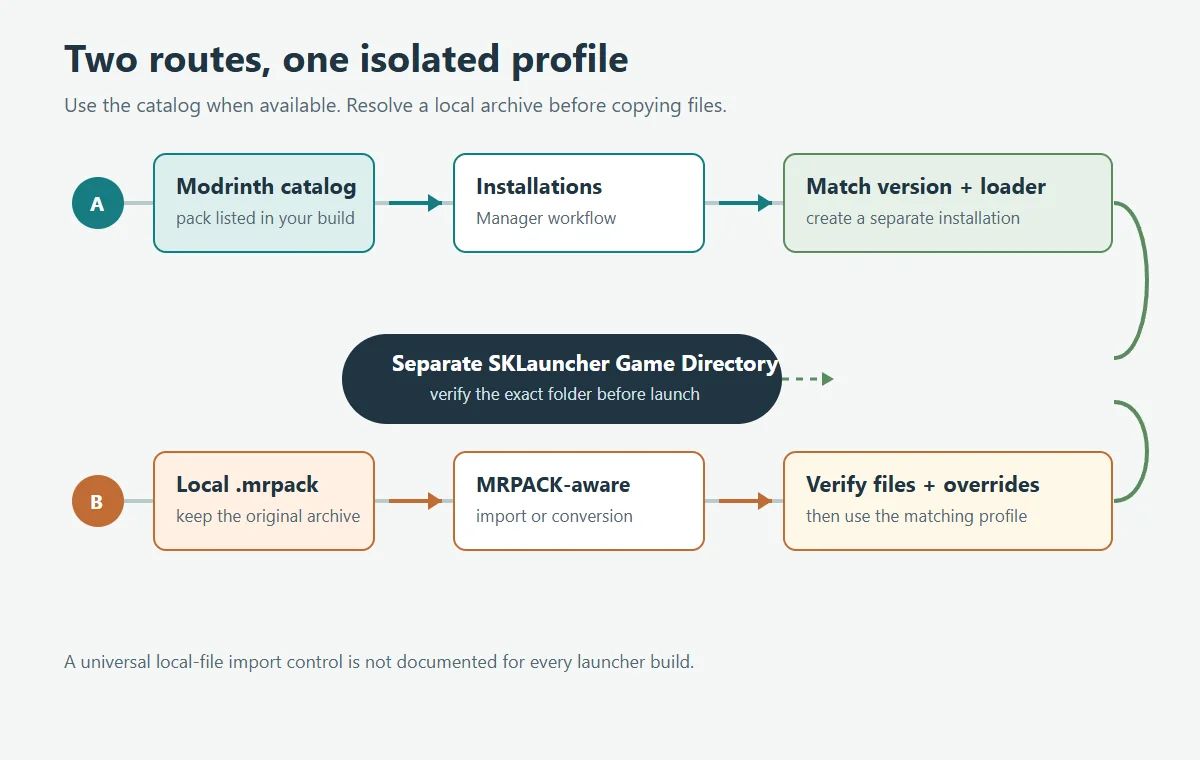
.mrpack into mods. Use a compatible MRPACK-aware workflow, check every dependency download, and keep the result in a clean installation directory with the matching loader.
Before you start: record the pack details
A modpack release is more specific than its project name. Open the exact Modrinth version and note its Minecraft version, loader family, and release identifier. A pack can publish separate Fabric, Forge, NeoForge, or Quilt files; select the same release in a launcher catalog or manual workflow.
Keep the original .mrpack unchanged until the installation works. Confirm that it is the actual downloaded archive rather than a saved project webpage or a renamed ZIP. If you need to inspect its contents, use the site's MRPACK Reader to review the manifest, paths, hashes, and overrides before moving files.
Use Installations Manager when your build offers the pack
SKLauncher's official launcher-related FAQ says compatible mod loaders and modpacks are managed from Installations Manager in the documented launcher workflow. The FAQ text names SKLauncher 3.2.x, so treat that version label as the scope of that particular documentation page, not as a claim about the newest build. Menu wording and available sources can differ between builds; compare the instructions with the help for the version you actually installed.
- Open Installations Manager. Find the area for creating or managing an installation. Use the modpack source shown by your build; do not assume that the controls match a different launcher.
- Choose the exact pack release. If the manager lists the Modrinth pack, compare its Minecraft version and loader with the Modrinth version page. If it shows a source or version chooser, select the same release you intended to install.
- Create a separate installation. Give it a name that includes the pack or release so you can distinguish it from vanilla or another modpack. Avoid replacing a profile that already contains worlds or custom settings.
- Set the loader and game directory. Use the loader required by the release. When the manager lets you choose a Game Directory, assign a new folder for this pack rather than sharing an existing modded profile.
- Let preparation finish. Wait for the launcher to resolve the loader and files. Before the first launch, confirm the installation name, game version, loader, and directory together.
This is the least manual path when your build offers the pack. We found no official instruction confirming a universal local .mrpack file picker, so follow the controls documented for your version instead of guessing at an undocumented button.
Find and isolate the installation's Game Directory
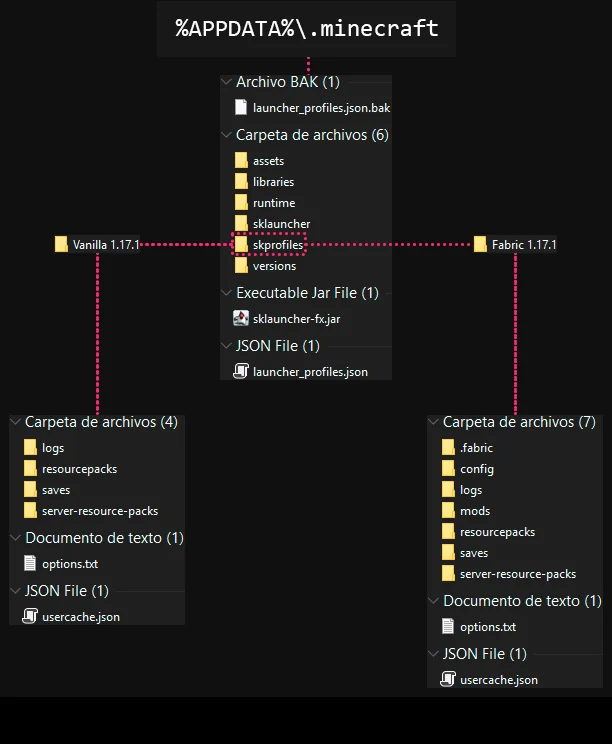
A separate Game Directory is important because SKLauncher installations can otherwise share files. The official documentation explains that a per-installation directory keeps items such as mods, options, and worlds apart. That reduces accidental mixing between packs, especially when one uses Fabric and another uses Forge or a different Minecraft version.
From the specific installation's menu, open its installation directory and verify the folder before copying. A custom Game Directory is the target for that profile; the global .minecraft directory may still hold shared launcher files.
If you have a local .mrpack file
An .mrpack is an installation recipe, not a single mod JAR. Its root modrinth.index.json records the pack's game dependencies and file entries; many actual mod files are fetched from the URLs listed in that manifest. An overrides directory carries files that should be copied into the game directory. Renaming the extension or opening the archive does not resolve those downloads.
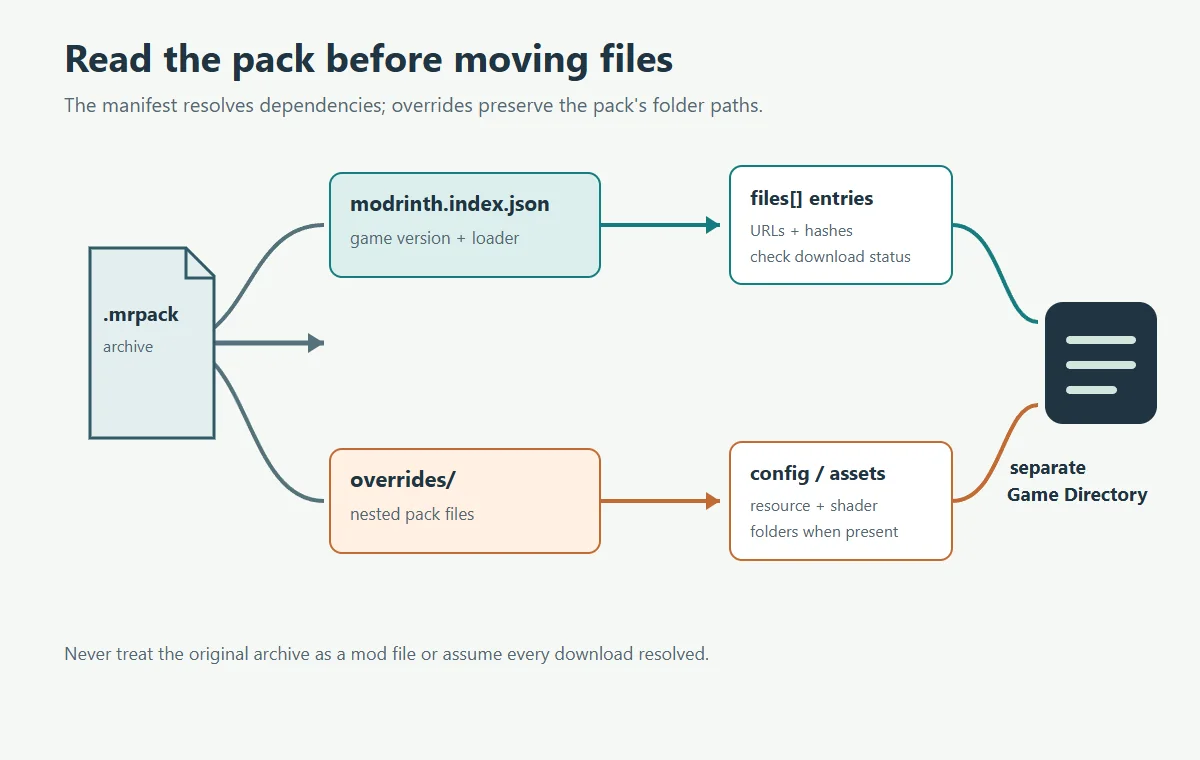
- Use a manifest-aware path. Import the local file in a launcher that documents MRPACK import, or use the site's MRPACK to ZIP workflow when you need files for manual setup. Keep the original archive as your reference.
- Review the result before copying. Check that
modrinth.index.jsonidentifies the expected pack and that referenced downloads completed. A browser tool may report files that a third-party host blocked or did not provide; do not assume a created ZIP contains every dependency. - Prepare the SKLauncher profile. In Installations Manager, create or select an installation with the same Minecraft version and loader. Give it a dedicated Game Directory and use the launcher menu to open that exact folder.
- Copy only resolved pack files. Put the downloaded mod files in the installation's
modsdirectory. Merge the archive'soverridescontents into the corresponding directory paths, such asconfig,resourcepacks, orshaderpackswhen those folders exist. Preserve nested paths and do not copy the outeroverridesfolder as if it were a game folder. - Keep personal data safe. Back up existing worlds and options before changing an installation. Do not replace an entire shared
.minecraftfolder or mix files from different packs to make an import appear complete.
For a pack that is missing from the manager, this manual method is a fallback, not proof that SKLauncher has a native local MRPACK importer. If you want a fully managed import with the pack metadata handled automatically, use a launcher whose current documentation explicitly supports importing local Modrinth packs, then use SKLauncher only with files you have verified can be moved safely.
Check the first launch in a useful order
Launch once and watch the log if the game exits. Check the Minecraft version, loader, completed mod downloads, override destination, and Java runtime in that order. This separates a setup mismatch from a mod that is genuinely broken.
Use a disposable world or backup for the first test. If a world crashes after the title screen, read the latest log for a missing dependency, invalid mixin, or incompatible mod. Change one cause at a time so you can identify what fixed or worsened the pack.
Common SKLauncher and MRPACK problems
| Symptom | Likely cause | What to check next |
|---|---|---|
| The manager does not show the pack | The installed build may not offer that project or release in its catalog. | Check the build's own documentation. Use a compatible MRPACK-aware importer or the manifest-aware ZIP workflow instead of guessing at a file-import control. |
| The profile opens vanilla Minecraft | The installation is using the wrong version or has no matching mod loader. | Compare the profile with the exact Modrinth release and install its declared loader. |
| Mods appear missing after copying | Some manifest downloads failed, or files went to a different Game Directory. | Review the converter/import log and open the installation directory from SKLauncher before copying again. |
| Configuration or resources are absent | Only the mods directory was moved, or the outer overrides folder was left nested. | Copy the contents of the override tree to matching paths in the isolated game directory. |
| The game crashes before the title screen | Minecraft version, loader, Java, or a required dependency does not match. | Read the first relevant error in the latest log, compare pack metadata, and repair one mismatch at a time. |
If the archive itself is unclear, the manifest field guide explains dependencies, file paths, hashes, downloads, and overrides. For a broader launcher choice, start with the general MRPACK installation guide. The TLauncher guide covers a different manual workflow and should not be treated as SKLauncher's menu instructions.
Frequently asked questions
Can SKLauncher import any local .mrpack file?
The official FAQ documents Installations Manager for modpacks, but the documentation we checked does not describe a universal file picker for arbitrary local .mrpack files. Confirm the instructions for your installed build. If there is no explicit local import option, use a compatible importer or the manifest-aware manual workflow above.
How do I install a Modrinth pack through Installations Manager?
Open Installations Manager and use the modpack source available in your build. Choose the exact Modrinth release only when its Minecraft version and loader match the release page, then create a separate installation and wait for file setup to finish.
Where should I put the converted mod files?
Use the Game Directory for the exact SKLauncher installation you prepared. Put resolved mod files in that directory's mods folder and merge override contents into their matching paths. Do not use a raw .mrpack archive as a mod.
Why do two SKLauncher profiles share mods or worlds?
They may be using the same Game Directory. Set a different directory for each pack and confirm it by opening the folder from the corresponding installation menu before you copy files.
Can I use a converted ZIP if SKLauncher does not list the pack?
Yes, as a manual fallback, provided you verify the resolved downloads and copy the pack's overrides into a matching installation. Conversion can report unavailable files, so inspect its result before treating the ZIP as complete.
The safe route
Use SKLauncher's Installations Manager when your build offers the Modrinth pack, and verify the Minecraft version, loader, and Game Directory before launching. When all you have is a local .mrpack, do not assume a universal native import control or place the archive in mods. Resolve its manifest and downloads with a documented importer or converter, then copy verified files into a new isolated installation and test from a backup.
Need to inspect or convert a local pack?
Use the browser-based MRPACK Reader to inspect its manifest, or open the MRPACK to ZIP converter and review any unavailable downloads before installing.